

08 Jan What is an Electronic Key Management System and Why Every Facility Needs One
Managing physical keys is a persistent operational and security challenge for modern organizations. Traditional methods such as paper logbooks, key lockers, legacy key cabinets or manual sign-in sheets result in lost keys, gaps in accountability, security risks and limited visibility. These inefficiencies don’t just slow down operations, they create real security risks, physical theft and reputational damage.
Table of Contents
An electronic key management system eliminates these risks by replacing manual key management processes with an automated solution. It gives organizations complete visibility into who has each key, when it was taken, and if/when it was returned, always ensuring complete accountability. With real-time monitoring, controlled key access, and automated reporting, facilities can significantly strengthen their security while streamlining daily operations.
What is an electronic key management system?
An electronic key management system (also known as a digital key locker, secure key locker, or key storage system) securely stores your organization’s physical keys and allows only authorized users to access keys.
It combines hardware, software, and authentication technologies to ensure every key is tracked, monitored, and controlled in real time. This type of sophisticated key management system eliminates guesswork and replaces manual processes with a systemised approach.
How electronic key control works
Electronic key control works by securing keys inside a secure cabinet. Each key is attached to a uniquely identified holder key or fob. Users authenticate their access to the cabinet via card reader, mobile credential or biometrics – to access only the keys assigned to them.
The system logs every interaction – who took a key, when it was taken, and when it was returned – creating a complete audit trail key system for compliance and tracking.
Hardware and software components
A modern key management solution includes:
- Electronic key cabinet
- Touchscreen interface for users to access keys
- Key Management software for managing access, monitoring and real-time reporting
Together, these components create a seamless key tracking system that removes manual errors and enhances accountability.
RFID, PIN and biometric authentication
Authentication is crucial for a secure key security system. Common methods include:
- PIN codes
- RFID cards
- Biometric verification such as fingerprint or facial recognition
These methods ensure only authorized staff can access keys, strengthening your overall key monitoring system.
Why organizations are switching to electronic key management
Organizations are adopting automated key management because traditional methods are inefficient and simply can’t keep up with modern security demands.
Eliminates manual key logs
Paper or spreadsheet logs are time consuming, unreliable, and prone to human error. Electronic systems record data automatically – accurate, consistent, and tamper-proof.
Prevents lost and stolen keys
Unaccounted keys can lead to serious security breaches. With a modern key management system, every key is secured when not in use and traceable when not secured in a cabinet.
Tracks every key removal and return
Every key movement is logged in real time. Administrators can instantly see:
- Who currently holds a key
- How long it has been out
- Whether it is overdue for return to cabinet
- Usage patterns and potential risks
This greatly improves the security and compliance of your facilities.
Real-time monitoring
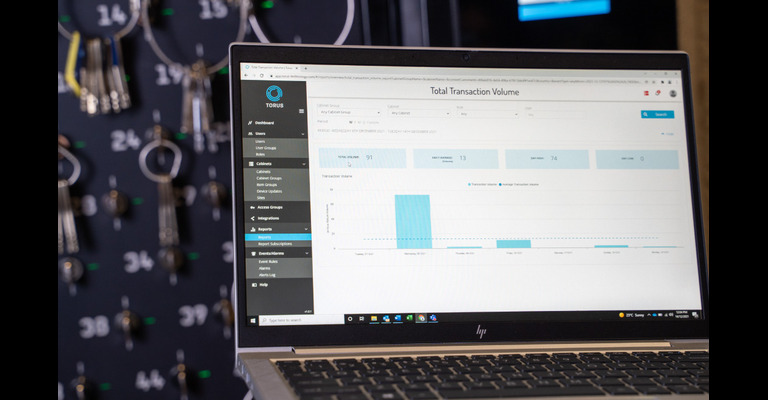
Managers can view live key status, user activity, and cabinet conditions through a dashboard via laptop or mobile device.
Automated alerts and notifications
Receive SMS & email alerts for overdue keys, forced entry attempts, unauthorized access, or unusual patterns – helping you act before small issues become incidents.
Audit trails for compliance
Electronic logs support internal audits, insurance requirements, and regulatory compliance, especially in high-security environments.
Cloud access and remote control
A cloud native key management platform allows organizations to manage multiple sites remotely. This enables you to manage access to keys from anywhere at anytime:
- Approve or revoke key access permissions
- View reports
- Monitor events and alarms
Which Industries Benefit the Most
Electronic key cabinets are used across all sectors because they solve a costly problem for all buildings and facilities.
Protect access to classrooms, labs, storage areas, and fleet vehicles while improving accountability among staff.
Secure master keys, housekeeping keys, and facility keys to reduce loss, improve shift handovers, and enhance guest safety.
Supports controlled access to medicines, restricted rooms, equipment storage, and emergency response areas.
Perfect for organizations managing shared vehicles, carpools, or machinery, ensuring only authorized and licensed drivers can access keys.
Ideal for high-security sites where compliance, audit trails, and strict access control are mandatory.
How to Choose the Right Electronic Key Cabinet
When evaluating a key security system, consider the following:
Ease of installation
Look for systems that are:
- Easy to install
- Don’t depend upon internal IT resources or expensive contractor services
Remote management
Look for systems that enable managers to control access to keys and monitor the whereabouts of them from anywhere at anytime – across your organisation.
Integration with access control
Look for systems that integrate with:
- Physical access control systems
- Credential management systems (eg Microsoft Entra ID, OKTA)
- Contractor management systems
- Visitor management platforms
Integration allows streamlined user management and improved security.
Type of authentication
Choose between PIN, RFID, biometric, or multi-factor authentication depending on your environment’s security level.
Cloud native vs Cloud enabled vs On premises: a strategic choice
One of the most fundamental decisions in software procurement is choosing between cloud-native, cloud enabled and on-premises deployments.
Cloud Native : refers to the software approach of building, deploying, and managing modern applications in cloud computing environments. Modern organizations want to build highly scalable, flexible, and resilient applications that evolve and update quickly to meet user demands.
Cloud Enabled: refers to legacy applications that were running on an on-premises data center but have been modified to run on the cloud. You can thus use the application from a browser while retaining its original features.
On Premise: refers to an IT infrastructure where all hardware, software and data storage are managed onsite by the client IT team. It requires the client to control and manage all aspects of the software applications including server hardware, server licences, software updates, database management and information security.
Your choice depends on your organization’s IT and security strategy.
Final Thoughts
An electronic key management system is no longer a luxury – it’s a necessity for any organisation that uses physical keys. By upgrading to an automated, intelligent solution, you can eliminate manual processes, enhance security, improve accountability, and significantly reduce the risk of key-related incidents.
Whether you’re managing a school, hotel, hospital, fleet, or industrial site, the right key management solution will transform how you control access across your facility.